Skills And Uses For Higher Education
Task 1
1. Justification of Article Selection
All
four articles were choosed because they address social media and safety in
higher education. The first article by Lacka et al. (2021) was chosen because it provides insights into the
effectiveness of digital technologies, including social media, in enhancing
student efficiency within higher education. The second article by Chavez and
Lamorinas (2023) discusses the reconfiguration of assessment practices in
online education during the COVID-19 pandemic, highlighting the challenges and
opportunities of integrating social media into academic settings. The third
article by Purnama and Asdlori (2023) addresses how social media influences
students' social perceptions and interactions, emphasizing the psychological impacts
of online engagement. Finally, the fourth article by Komljenovic (2022) was
selected for its critical analysis of the implications of digitalisation in
higher education, particularly focusing on data privacy and the broader
economic impacts. All these articles explain in detail how social media
influences education and what risks it can bring.
2. Literature Review
Introduction
Universities
are influenced by social media, bringing benefits as well as difficulties.
Although it encourages people to work together, using the internet leads to
problems with efficiency, how others see a company and privacy. This literature
review explores the way social media connects with higher education, touching
on the advantages, disadvantages and its safeguarding.
Efficiency and Social Media
Use
Lacka
et al. (2021) explore the role of social media as part of digital technologies
in the academic context. The study identifies Virtual Learning Environments
(VLEs) and social media as pivotal in supporting higher education goals. While
using VLEs improved students’ achievements, using social media too often seemed
to harm their learning.

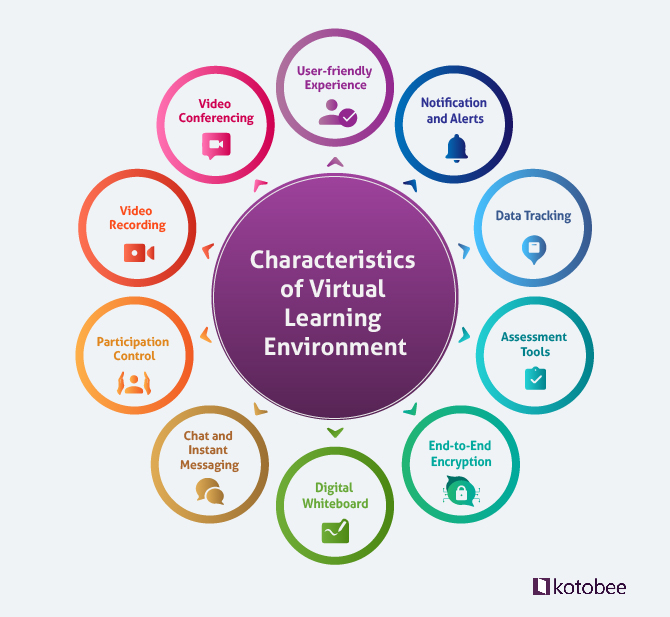
Figure 1: Characteristics
of virtual learning
(Source:
https://blog.kotobee.com/)
It
appears that using technology in education holds promise, but uncontrolled use
of social media can cause a decrease in productivity. Therefore, organised
digital literacy programs should be offered to students to teach them how to
use social media well for studies.
Social Media's Role in Social
Perception and Interaction
Purnama
and Asdlori (2023) delve into the psychological and social impacts of social
media on students. According to the study, social media causes students to
communicate and interact with each other mainly online instead of in person. As
a result of this change, individuals may face social expectations and start to
experience mental health concerns. It suggests that people be educated about
the risks of social media. The study shows that universities should teach
students how to manage social media use and minimise any negative psychological
consequences.
Assessment and Safeguarding
in Digital Learning
The
use of online education platforms increased as a result of COVID-19. Chavez and
Lamorinas (2023) highlights how social media and online tools were integrated
into assessment practices during this period. According to them, social media
contributed to improved communication, but they found student data and academic
integrity to be challenged while maintaining. To ensure all evaluations were
fair and data was secure, teachers had to develop new ways. It is evident from
this study that assessment approaches must address matters concerning social
media and different digital technologies to maintain educational quality.
Digitalization and Data
Privacy Concerns
Komljenovic
(2022) addresses the implications of digitalisation in higher education,
emphasising that data privacy concerns are often overlooked in favour of
technological advancement. The study advises against considering social media
only as a source of information, as it also affects the economy and politics.
According to this, universities are encouraged to focus on how they manage
student data and what can be gained from it. The perspective calls for digital
policies that cover more than privacy, by also addressing ethical methods of
data usage in schools.
Discussion
Social
media being used in higher education results in both positives and negatives.
From another perspective, platforms allow students to socialise, share
resources and learn collaboratively (Hashim et
al. 2022). On the other side, without proper control, this technology can
result in less productivity in school, added stress and security risks with
personal information. Many studies suggest that digital literacy should be
organised with instruction on how to properly use social media. In addition,
institutions ought to have reliable policies that manage psychological and data
safety.
Conclusion
Many
studies mention that social media can serve two roles in higher education.
Although it can benefit education greatly, it should be managed with data
security and skill in using technology. Keeping a good balance with social
media helps teachers ensure that technology improves, rather than harms,
academic performance.
Task 2
1. Description and Evaluation of Software Applications
For
making an academic poster, it’s best to use tools that can deal with images,
format text and integration in various types of media. There is a wide range of
applications specifically designed for this, giving many special features and
benefits.
People
use Microsoft PowerPoint, also known as PPT, often. Anyone can use it easily,
it is widely accessible and includes several templates for making academic
posters (Tarigan and Listyani, 2021). Presentations made in PowerPoint are
appealing thanks to its simple integration of charts, diagrams and images. One
more tool is Canva which can be used online and includes numerous designs and
custom elements. Even people with no design experience will find Canva easy to
use. Its library contains many icons, images and fonts as well.
Many
professionals rely on Adobe Illustrator due to its high precision and the
fantastic results it produces. Still, it takes longer to learn and is not open
to everyone since it needs a subscription. Other apps, such as PosterMyWall and
Lucidpress, are useful for group work because they support online collaboration
when making posters (Mali et al.
2021).
The
best suitable and accessible is Canva and PowerPoint. With so many templates
and custom tools, Canva is ideal for designing beautiful posters. At the same
time, PowerPoint is suitable for setting up organised presentations and adding
lots of text. Canva is a better choice for academic posters since its focus on
design and open layout customisation gives it an edge.
2. Poster

Figure 2: Poster
(Canva)
3. Reflection on Creating the Academic Poster
I
found useful and interesting to make an academic poster on social media and
online safety. I found the best application, prepared a layout for the poster
and merged together pictures and text.
Software Choice
I
selected Canva for making the poster as it is straightforward and provides
numerous custom templates. There was no need to learn complicated steps, as I
easily dragged images, icons and text onto the poster in Canva. Because many
templates were already available, I did not have to spend much time starting
new projects. In addition, I planned to use Microsoft PowerPoint after the
research to arrange the information and make the writing clear for everyone.
Canva is both easy to operate and equipped with strong graphics tools, whereas
PowerPoint does not include such features.
What Went Well
It
was easy to design the poster, especially when considering how it looks and its
organisation. I used Canva’s templates to help me start, and adjusting the
settings allowed me to make the poster match the theme (Hidayati et al. 2024). Because I could easily use
diagrams and icons, the text and images were well aligned. Moreover, Canva’s
ability to export the poster in multiple formats (like PDF and PNG) was
particularly useful for submission requirements.
Areas for Improvement
I
succeeded in designing the poster, but I encountered some problems with the
consistency of the text. There were moments when the font sizes and positioning
differed within a design. I made the text boxes fit, but this caused an
increase in the time I spent on the final layout. I also needed to keep the
poster informative while avoiding a cluttered look. I had to make several
changes to the text and visuals before it was balanced.
Alternative Software
Considerations
By
combining Canva with PowerPoint, I might have completed the task faster.
PowerPoint enables to set up your text, so this feature could have helped you
during the first draft. When the content was set, I could open Canva to improve
how it looks. Also, using Adobe Illustrator could have improved the appearance
of the graphic elements, although it would have taken additional time to use
the program effectively.
Reflection on Software
Selection
I
decided to use Canva for many of my designs because it was simple to master and
generated impressive results. Using PowerPoint to lay out the information first
could have improved the process. Both softwares offer advantages, and combining
their powers can result in better arrangements and looks. Additionally, using a
platform like Lucidpress for future group projects can be helpful since it
allows all members to contribute their thoughts at the same time.
Conclusion
Making
the academic poster with Canva was informative and pointed out why it’s useful
to find the right software for different tasks. Though Canva had powerful
design tools, it would have been more convenient to use PowerPoint to organise
the text. In upcoming work, I intend to use several software applications to
create a better design and improve how the information is presented. I have
realised that both the appearance and the details of a poster are important in
academics.
Journals
Chavez, J. and Lamorinas, D.D., 2023.
Reconfiguring assessment practices and strategies in online education during
the pandemic. International Journal of Assessment Tools in Education, 10(1),
pp.160-174.
Hidayati, A., Zuhdi, S.,
Resti, M., Azaria, T.T. and Andary, L., 2024, December. Use of Canva in Primary
School Education: A Qualitative Study of The Use, Advantages and Disadvantages
of Canva. In ICEETE Conference Series (Vol. 2, No. 1, pp.
322-326).
Komljenovic, J., 2022. The future of value in
digitalised higher education: why data privacy should not be our biggest
concern. Higher Education, 83(1), pp.119-135.
Lacka, E., Wong, T.C. and Haddoud, M.Y.,
2021. Can digital technologies improve students' efficiency? Exploring the role
of Virtual Learning Environment and Social Media use in Higher Education.
Computers & Education, 163, p.104099.
Mali, Y.C.G., 2021. Using
postermywall to practice communication in a foreign language classroom. Teaching
English with Technology, 21(3), pp.89-100.
Mohamed Hashim, M.A., Tlemsani, I. and Matthews, R., 2022. Higher eduation strategy in digital transformation. Education and Information Technologies, 27(3), pp.3171-3195.
https://www.emuarticles.com/balancing-perfectionism-and-productivity-in-college-assignments/
https://latestdigitals.com/building-the-digital-world-a-look-at-the-pioneers-in-tech/
https://edudems.com/the-future-of-academic-services-trends-and-predictions/
Purnama, Y. and Asdlori, A., 2023. The role
of social media in students’ social perception and interaction: Implications
for learning and education. Technology and Society Perspectives (TACIT), 1(2),
pp.45-55.
Tarigan, R. and Listyani,
L., 2021. Poster presentation as a tool to assess students’ academic speaking
performance: Teachers and students’ perspectives. Lensa: Kajian Kebahasaan,
Kesusastraan, Dan Budaya, 11(1), p.1.


Comments
Post a Comment